Chrome extension

Read hands-free at a steady pace

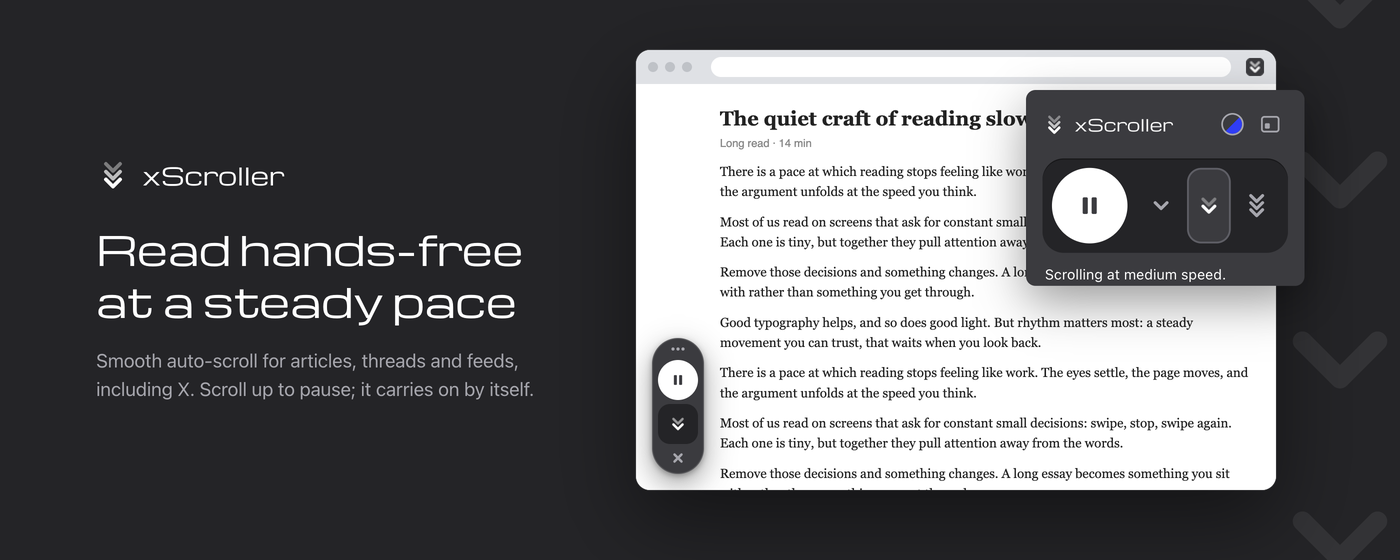
For people who read a lot on screen: long articles, research, threads and busy X feeds. xScroller scrolls at a steady pace you set. Scroll up to pause; it carries on by itself.

  • Free
  • No data collected
  • Works on X
reading.example/the-quiet-craft

The quiet craft of reading slowly

Long read · 14 min

There is a pace at which reading stops feeling like work. The eyes settle, the page moves, and the argument unfolds at the speed you think.

Most of us read on screens that ask for constant small decisions: swipe, stop, swipe again. Each one is tiny, but together they pull attention away from the words.

Remove those decisions and something changes. A long essay becomes something you sit with rather than something you get through.

Good typography helps, and so does good light. But rhythm matters most: a steady movement you can trust, that waits when you look back.

Try it now. Scroll up inside this page while it's moving, and watch the controls count down before carrying on.

Readers have always found their own tempo. Monks copying manuscripts read aloud, at the speed of the voice. Typesetters measured lines so the eye could travel without strain.

Screens took that tempo away and handed us a flick of the thumb instead. Fast, yes, but jerky: every flick a small interruption.

A steady scroll gives some of it back. The text arrives at the pace you chose, and your hands are free to do nothing at all.

On busy feeds the effect is stronger still. Posts pass by like a slow river, and when something catches your eye you simply scroll up. The river waits.

Then, after a moment, it moves on again, and so do you.

— End of the article —
Press play on the controls. Scroll up in the page to pause.

Who it's for

Made for people who read a lot on screen

If your day includes long pages, a few thousand words or an endless feed, scrolling by hand becomes its own small job. xScroller takes it off your hands.

Long-form readers

Essays, long reads and newsletters at a steady pace you choose. Sit back and read; the page keeps up with you, not the other way round.

Researchers and students

Work through long documentation, reports and articles without losing your place. Scroll back to check a detail and it waits for you.

Heavy X users

Long threads and timelines roll by smoothly, even while X loads new posts. Built to follow the main timeline, not the sidebar.

Content creators

Scan feeds, comments and references for ideas with your hands free for notes. Slow down for the good parts, speed up through the rest.

Social media managers

Review mentions, hashtags and competitor accounts in one steady pass, with a separate speed in each tab you keep open.

Anyone who'd rather not scroll

Give your wrist a break, or read while you eat, cook or hold a coffee. Press play once and let the page come to you.

What it does

Press play. The page moves.

No settings to learn, nothing to configure. Scroll up to re-read something and xScroller pauses for a few seconds, then picks up where you are.

Three speeds, per tab

Slow, medium and fast. Each tab remembers its own speed, so a slow read in one tab and a fast skim in another don't interfere.

Pauses when you scroll up

Mouse wheel, trackpad, touch, or the ↑, Page Up, Home or Shift+Space keys. It resumes on its own after a few seconds, or press play to continue right away.

Controls on the page

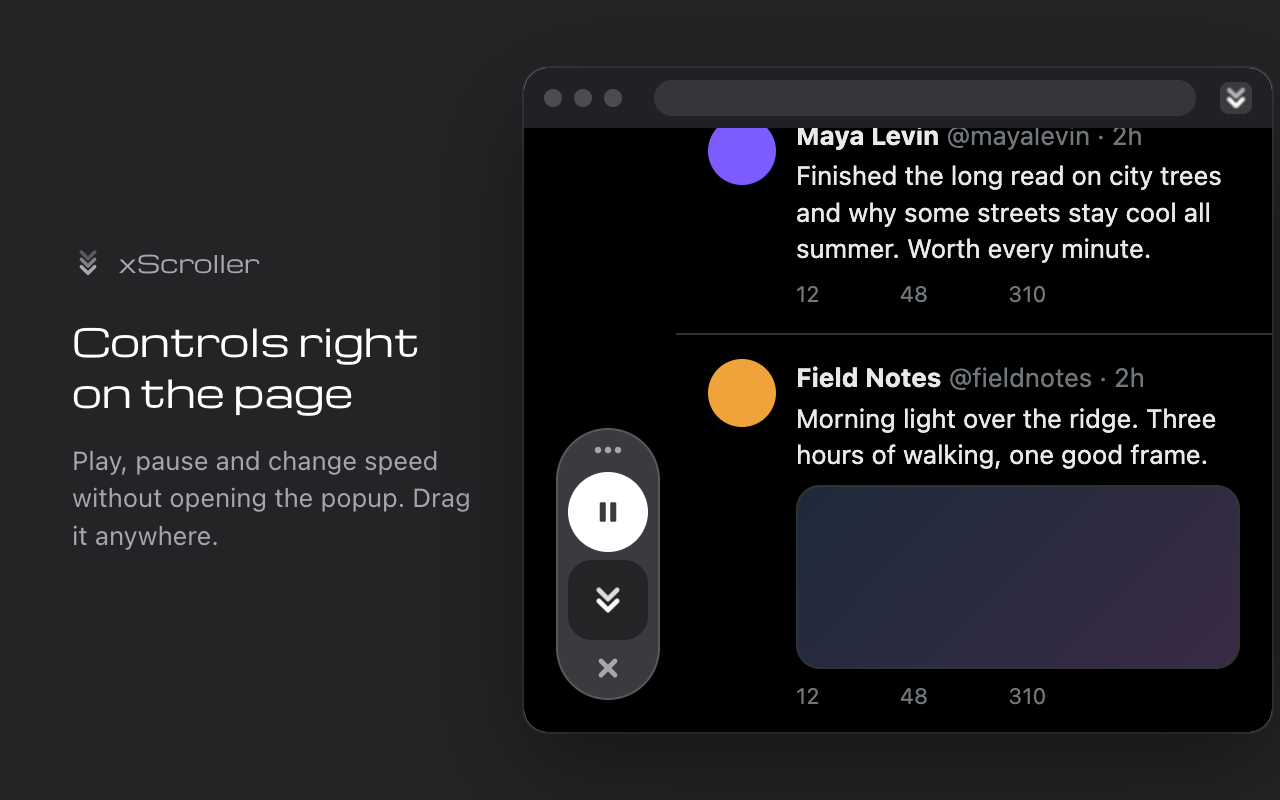
Pop a small floating panel onto the page with play/pause and speed. Drag it anywhere, or hide it with one click.

Smooth on heavy pages

Frame-synced scrolling that stays steady even on long, busy pages, and stops cleanly when it reaches the end.

Two looks

Graphite (default) and blue. Your choice applies to the popup, the on-page controls and the toolbar icon.

Keyboard friendly

Screen-reader labelled controls, visible focus, and it respects your system's reduced-motion setting.

Built for X (Twitter)

Stays smooth while the feed reshuffles

Most auto-scrollers stutter or stop on X, because the timeline constantly reshuffles itself as posts load. xScroller is made for that: it follows the main timeline (not the sidebar), stays smooth while new posts load in, and keeps going as the feed grows.

It works just as well on news sites, blogs, documentation, forums and any long page.

xScroller's graphite on-page controls scrolling an X feed in dark mode
Two looks

Graphite or blue

The same design in two skins. Pick one here to see this page change, just as the popup, the on-page controls and the toolbar icon do in the extension.

How to use

Four steps, the last one optional

  1. 1

    Click the xScroller icon in the toolbar.

  2. 2

    Pick a speed and press play.

  3. 3

    Scroll up any time to pause; it resumes by itself.

  4. 4

    Optional: click the panel button to keep play/pause on the page.

Privacy

xScroller collects no data

It makes no network requests, and has no accounts, analytics or ads. Your speed and look preferences are stored locally in your browser and never leave your device.

Read the full privacy policy →

storage
Remembers your look and each tab's speed, locally.
activeTab
Acts only on the tab where you click the xScroller icon. No access to other sites.
scripting
Loads xScroller's own scrolling code into that tab when you press play. Nothing is read or sent anywhere.
xScroller: read hands-free at a steady pace

Let the page come to you

Add to Chrome, it's free